What to Build with Muse Spaces: 12 Ideas from Meta's Demos and Zuckerberg's Own List
From a BBQ game and a home control dashboard to a family dashboard and a retro shopping catalog, here are the Spaces worth building first, drawn from Meta's launch demos and the Muse thread.
 By Icarus4 min read

Meta launched Spaces with a long list of examples, Mark Zuckerberg posted his own three, and the launch demos show several more in action. The pattern underneath them is that anything with a routine behind it makes a good Space. Here are twelve ideas worth building first, drawn from what Meta showed.
From Zuckerberg’s List
1. A BBQ game. Zuckerberg’s first example is a game he built himself, and it fits the pattern Meta keeps repeating: a Space does not have to be productive to be worth building. The Muse thread’s own game example is Jolly Jump, built entirely inside a Space. A trivia game about your favorite team works the same way.
2. An event tracker. Zuckerberg’s second Space tracks events. The demo version of this is the Family Dashboard, which pulls the day’s events, school pickups, and calendar items into one view. Meta’s blog adds a music tracker, which follows new releases and upcoming shows for the artists you love.
3. A home control dashboard. Zuckerberg’s third Space is a dashboard for the home. Meta has not shown what is inside it, but the pattern is the same as the other dashboards in the launch: live information from connected apps, in one view, updated in the background.
From Meta’s Demos
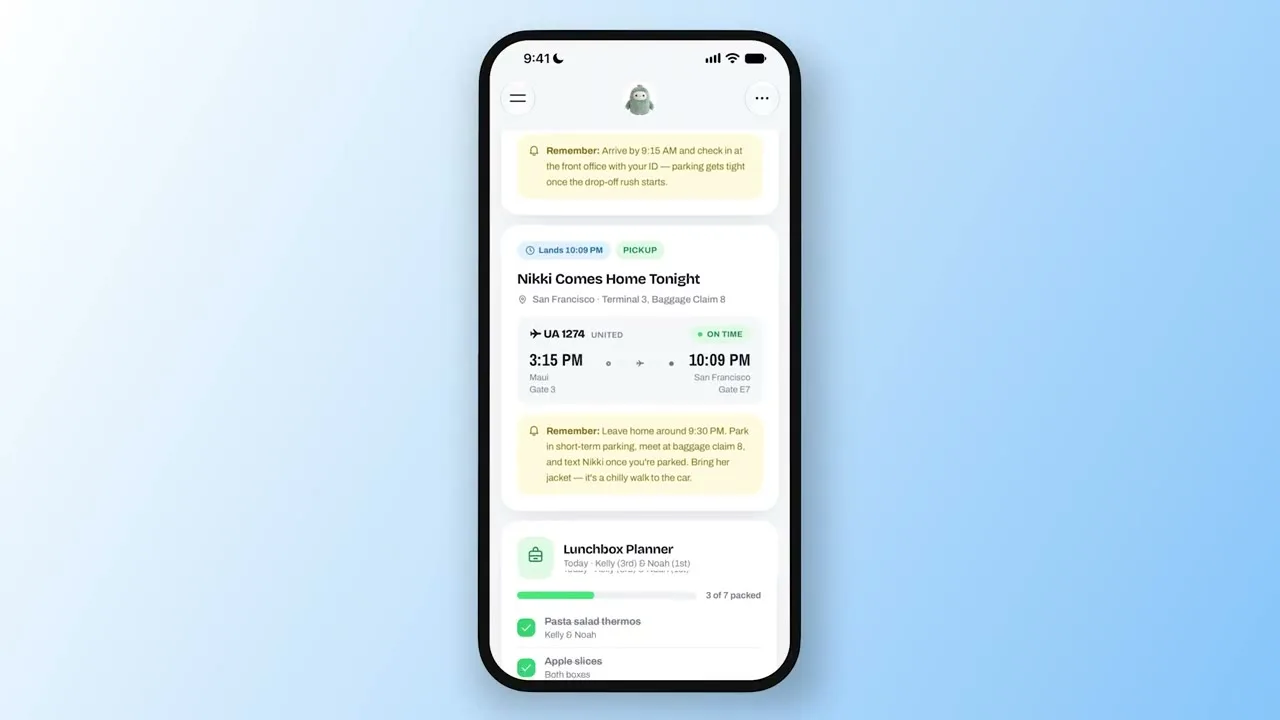
4. A Family Dashboard. The Family Dashboard is the launch video’s main demo. It tracks a flight home, a school pickup with a reminder to leave at 9:30 PM, and a Lunchbox Planner that counts packed lunches, 3 of 7 in the demo. Ask for a movie night section and it appears, with The Wild Robot lined up for Friday.
5. A retro shopping catalog. Jolly Mall turns saved Instagram posts into a Fall ’95 mail-order catalog, “Mall in the Sky,” with product pages and buy-now buttons. One page shows a Haand Diner Mug Pair at $79.98. It shows a Space can be designed with a look of its own.
6. A garden notebook. The Threads demo builds a field notebook from walks: a photo, a name, and where each plant was found. Five finds, five species, five places, with an “Unknowns” tab for the ones not yet identified. The same notebook pattern works for anything collected over time: books, records, recipes, wines.
7. A trip planner. The Scotland Trip Planner shows up in three different demos. It holds flights, hotels, reservations, and a day-by-day itinerary, and in Meta’s announcement video Muse adds a golf tee time to it from a chat message.
From Meta’s Blog List
8. A shopping hub. Holiday and birthday gift ideas, wishlists from Instagram saves, and Marketplace listings and buyer messages in one view. The Muse thread’s version sorts the same idea by person, with prices, ratings, and who is free that week.
9. A school dashboard. It finds events relevant to your kids in school emails and adds them to the calendar. The same connected-apps pattern powers two more: an order tracker for a small business, covering new orders, customer messages, and what needs to ship today, and a client hub for freelance work, with projects, deadlines, and invoices.
10. A podcast studio. Episode ideas, research, and scripts together in one Space. The wedding planner works the same way: RSVP list, vendor invoices, and to-dos in one place.
From the Muse Thread and the Sidebar
11. An inbox sorter and a restaurant list. The Muse thread’s examples include an inbox sorter that ranks direct messages by what matters to a business, a board-game scorekeeper, a tracker for coin listings, a recurring to-do list, and a restaurant list built from Instagram saves. Meta’s own sidebar screenshot shows the same range in miniature: Callie Care, Chess Training, Scotland Trip Planner, Running, and Fantasy Football.
12. A run log and a weekly meal plan. The Threads demo ends with a row of example Space icons: a garden notebook, pet care, weekly meals, a run log, a concert tracker, and games. A run log that tracks distance and pace, or a weekly meal plan with a shopping list, follows the same tracker pattern as the rest of the list.
Where to Start
Pick the routine you already repeat. The Spaces that work in the demos all track something that happens every day or every week: pickups, lunches, workouts, trips, orders. Build one, use it for a week, and ask Muse for the missing piece when you find it. The step-by-step guide covers how to build your first Space, and the explainer covers what Spaces are and how they work.